


The CMS L564 form proves you had employer group health coverage so you can enroll in Medicare Part B during a Special Enrollment Period without a late penalty. You need it if you delayed Part B because you or your spouse were working and covered by a group health plan. Here’s what to do right now:
- Download the official form from Cms
- Fill out Section A yourself, then hand it to HR for Section B
- Attach Form CMS-40B when you submit to Social Security
The clock matters here. Your group coverage can’t have ended more than eight months ago, or you lose Special Enrollment Period eligibility and could face a permanent Part B premium penalty.
Key Takeaways
Filing the CMS-L564 correctly within the eight-month Special Enrollment Period is what prevents a permanent Medicare Part B late enrollment penalty.
| Point | Details |
|---|---|
| Use the official form only | Download CMS-L564 directly from Cms, not a third-party copy. |
| Split the sections correctly | You complete Section A; your employer’s HR department must complete Section B. |
| Watch the 8-month window | Coverage that ended more than eight months ago disqualifies you from this Special Enrollment Period. |
| Have a fallback ready | If HR won’t sign, submit W-2s, pay stubs, or a benefits letter as alternative proof instead. |
| Get expert review before submitting | Greenins offers form review and enrollment support through certified Medicare Insurance Planners® for readers near Jacksonville, FL. |
Table of Contents
- Where to Get the Official CMS L564 Form
- How to Fill Out CMS L564 Section A
- Getting Your Employer to Complete Section B
- Submitting the Form and the 8-Month SEP Deadline
- What to Do When Your Employer Won’t Sign Section B
- Your CMS L564 Submission Checklist
- What Actually Matters When HR Drags Its Feet
- Get Hands-On Help With Your Medicare Paperwork
- Sources
Where to Get the Official CMS L564 Form
Skip anything you find through a Google image search or a third-party PDF repository. The only version that matters is on CMS.gov, available as both an HTML page and a downloadable PDF. The current version is Form CMS-L564, revised March 2025, carrying OMB No. 0938-0787 in the corner. That number is not decoration. It’s how Social Security confirms the form hasn’t expired or been altered.
A few practical notes on formats:
- The PDF is fillable on-screen or printable for a pen-and-ink signature
- Large-print and alternate-format versions may be published by CMS for accessibility; check the CMS.gov page directly for current availability
- Use the actual PDF for signatures, not a screenshot or a scanned photocopy of someone else’s completed form, since SSA reviewers expect clean, legible originals
Grabbing the current PDF straight from CMS also protects you from submitting an outdated version that gets kicked back for revision, which just burns days you don’t have inside your enrollment window.
How to Fill Out CMS L564 Section A
Section A is your part, and it’s short. Here’s the order to work through it:
- Write your name and Social Security number exactly as they appear on your Social Security card.
- List your current mailing address and phone number so SSA can reach you if something’s unclear.
- Enter the employer’s name and address as your HR department writes it, not an abbreviation you’re used to using.
- Note the dates you’re applying for, using the mm/yyyy format the form requests. Don’t write out full dates or leave the year off.
- Sign and date the bottom of Section A before you hand it off.
The most common error is guessing at exact coverage dates instead of leaving that judgment call to HR in Section B. Your job is just your personal information.
Pro Tip: Print two copies before you go to HR. Complete Section A on one, and leave the second blank as a backup in case the first gets marked up or misplaced during the handoff.
If you have the option, use the fillable PDF rather than printing and handwriting. Typed entries are easier for HR and SSA staff to read, and they cut down on the back-and-forth that happens when someone can’t decipher your handwriting.
Getting Your Employer to Complete Section B
Section B belongs to HR, and it asks for specifics your employer’s benefits team, not you, has to confirm:
- Whether you (or your spouse) currently have or previously had group health coverage
- The exact start and end dates of that coverage, in mm/yyyy format
- Your dates of employment
- Hours Bank arrangement details, if your coverage falls under one, along with which months the group plan served as primary payer for disabled beneficiaries
- The signature and title of an authorized HR representative, not just any coworker
Small companies and HR generalists often haven’t seen this form before, which is why they stall. A short, specific ask works better than a vague request to “fill out some Medicare paperwork.”
Try something like: “I need Section B of this CMS form completed to enroll in Medicare without a penalty. It just needs our coverage dates and a signature. Here’s the official link from CMS.gov, and I’ve already filled out my half.”
Pro Tip: Attach the direct CMS.gov link and your completed Section A in the same email. HR staff move faster when they don’t have to go hunting for the form themselves.
Submitting the Form and the 8-Month SEP Deadline
Once both sections are done, mail or fax the completed CMS-L564 along with CMS-40B to your local Social Security office. Ssa will give you the correct address and fax number. Don’t mail it to a generic SSA address. Local offices route Medicare enrollment paperwork differently than other Social Security business.

The eight-month Special Enrollment Period starts the month your employer coverage or your job ends, whichever comes first. Miss that window and you’re likely stuck waiting for the General Enrollment Period, with a permanent premium penalty added on top. There’s no grace period for “I didn’t know.”
A few habits that save headaches later:
- Keep a copy of the completed form and CMS-40B before you send anything
- Get a fax confirmation sheet or use certified mail with tracking
- Follow up by phone with your local office roughly two weeks after submission if you haven’t heard back
Readers weighing other SEP qualifying events beyond employer coverage, such as moving or losing other coverage types, can find more detail in this guide to SEP qualifying events.
What to Do When Your Employer Won’t Sign Section B
Some employers are slow. A few flatly refuse, usually out of unfamiliarity rather than malice. Either way, you’re not stuck. Medicare confirms Social Security will accept alternative proof when Section B goes unsigned:
- Submit your W-2 forms showing pretax medical deductions for the relevant years.
- Gather recent pay stubs that list employer health plan contributions.
- Request a benefits letter on company letterhead stating your coverage dates if HR won’t complete the form itself.
- Label each document clearly with your name and the coverage period it covers before sending.
- Submit everything anyway, even without Section B, along with a short written timeline of your attempts to get HR’s cooperation.
Pro Tip: Save every email and message where you asked HR for help. If SSA questions the timeline, that record backs your case for a review.
Federal employees have an easier path here: OPM will complete a CMS-L564 directly when it holds your employment records, bypassing the HR runaround entirely.
Your CMS L564 Submission Checklist
Before you seal the envelope or hit send on a fax, confirm you have:
- Completed Section A, signed and dated
- Completed Section B, or your alternative evidence packet if HR wouldn’t sign
- The completed CMS-40B
- Copies of everything for your own records
- Proof of transmission (fax confirmation or certified mail receipt)
- A brief cover letter noting your name, SSN, and the coverage period in question
Processing times vary by local office workload, but most applicants hear back within a few weeks. If SSA needs clarification, they’ll typically call or send a letter requesting specific missing information rather than rejecting the application outright. Keep your copies until you receive written confirmation that your Part B enrollment is active. Coverage delays can compound if a document goes missing and you have no proof it was ever sent.
What Actually Matters When HR Drags Its Feet
Most advice on this topic treats CMS-L564 like a formality. Fill in some boxes, get a signature, done. That’s not how it plays out for a lot of people, especially those retiring from small businesses or family-run companies where nobody in HR has processed a Medicare form before.
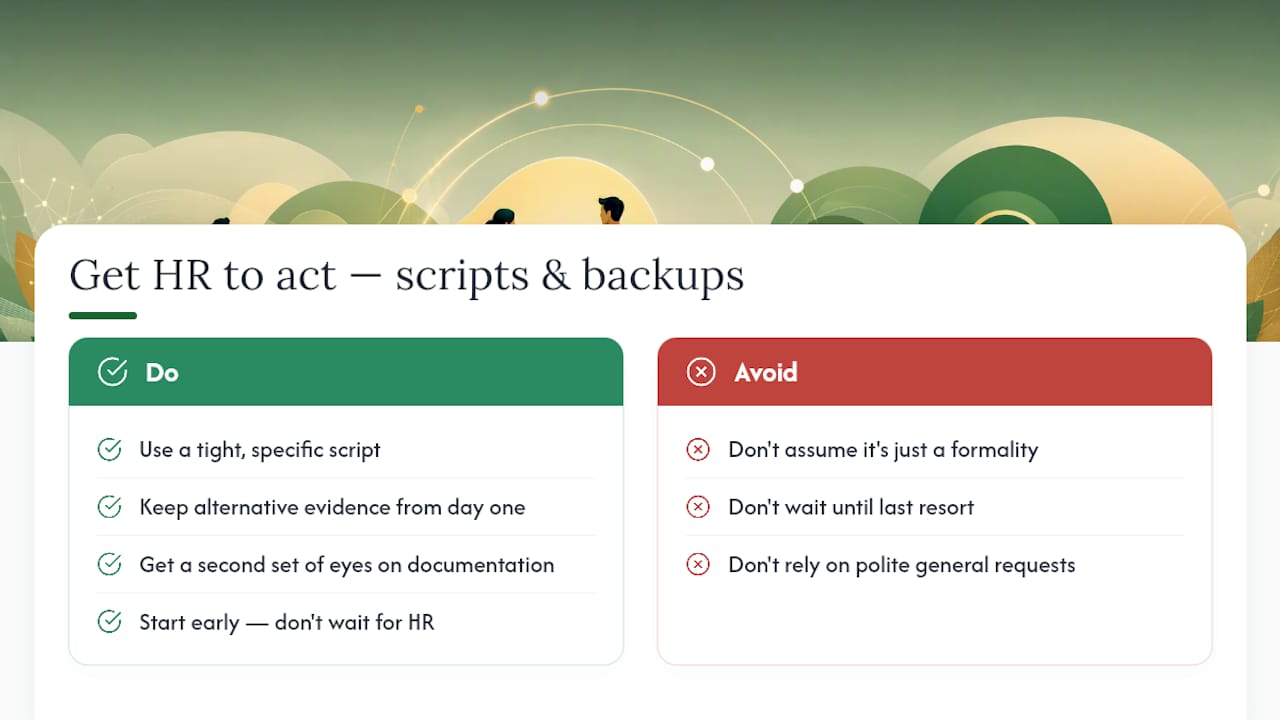
The real bottleneck isn’t the paperwork. It’s convincing someone who has never seen this form that it’s worth their time before your eight-month window closes. That’s why a tight, specific script beats a polite general request every time, and why keeping alternative evidence ready from day one, not as a last resort, is smarter than waiting to see if HR comes through.
I’d also push back on the idea that this is purely a solo task. The stakes, a permanent premium penalty for a missed deadline, are high enough that getting a second set of eyes on your documentation before you submit isn’t overkill. It’s just good sense. Where the conventional guidance falls short is in treating every employer as equally cooperative and every applicant’s coverage history as equally simple. Neither is true, and the fallback path deserves as much attention as the ideal one.
— Zach
Get Hands-On Help With Your Medicare Paperwork
Greenins is the alternative to figuring this out alone at your kitchen table, especially if your employer is slow to respond or your coverage history has a wrinkle SSA might question. Instead of guessing whether your Section A entries are formatted correctly or whether your alternative evidence packet will hold up, you get a certified Medicare Insurance Planner® who reviews your CMS-L564 before it goes out the door.
Greenins has built its reputation in Clay County, Florida on more than 625 client reviews, largely because the help doesn’t stop at paperwork. Our team can walk you through obtaining employer documentation, double-check your Special Enrollment Period timing, and then help you compare Medicare Advantage, Supplement, and Part D options once your Part B enrollment is confirmed. If you’re in Orange Park, Fleming Island, or anywhere around Jacksonville, schedule a consultation with Greenins and get your enrollment paperwork reviewed before you mail anything.