

Medicare Summary Notice: What Beneficiaries Should Check Every 180 Days

A Medicare Summary Notice (MSN) is the federal government’s official record of the Medicare Part A and Part B claims filed on your behalf. It is not a bill, and you should never pay a provider based on it alone. Instead, treat it as a receipt to check against your own records. If you received care during the reporting period, expect one every six months by mail, or faster if you switch to electronic notices.
TL;DR:
- Medicare mails paper MSNs every 180 days if claims are processed; switching to electronic notices through Medicare.gov provides monthly updates and faster claim status checks.
- Always verify your name, Medicare number, and claim dates on your MSN, and match each service with your own records to identify errors or denied claims early.
- Do not pay providers based solely on the MSN; contact the provider for clarification or corrections before submitting a formal appeal if needed.
- Keep MSNs until the matching provider bill arrives to compare amounts and avoid paying incorrectly or missing billing errors.
- MSNs and Explanation of Benefits differ in origin and coverage; know which one applies to you to direct your questions appropriately.
Table of Contents
- What Shows Up on Your Medicare Summary Notice
- When You’ll Get an MSN and How to Go Digital
- How to Read Your Medicare Summary and Catch Problems Early
- What to Do When You Spot a Mistake or a Denied Claim
- Medicare Summary Notice vs. Explanation of Benefits
- A Certified Planner’s View on the Mistakes People Actually Make
- Get Help Reading Your Notice From a Local Medicare Planner
- Sources
- FAQ
What Shows Up on Your Medicare Summary Notice
The redesigned MSN format opens with a dashboard on page one that shows the date issued, your deductible progress for the year, and the total amount you may owe across all listed claims. From there, the notice breaks into a claim-by-claim listing.
Each entry on those claims pages tells a specific story about one visit or service:
- The provider’s name and the date of service
- What the provider billed versus the Medicare-approved amount
- How much Medicare paid toward that claim
- The maximum amount you may be billed by the provider
- A “Service approved?” column marked yes or no
The last page carries general messages from Medicare plus step-by-step appeal instructions if you disagree with a decision. Depending on what kind of care you received, you might get a Part A notice for hospital stays, a Part B notice for outpatient and doctor visits, or a durable medical equipment (DME) notice for wheelchairs, oxygen supplies, and similar gear. Each version follows the same basic layout, just with different claim types filling the middle pages.
When You’ll Get an MSN and How to Go Digital
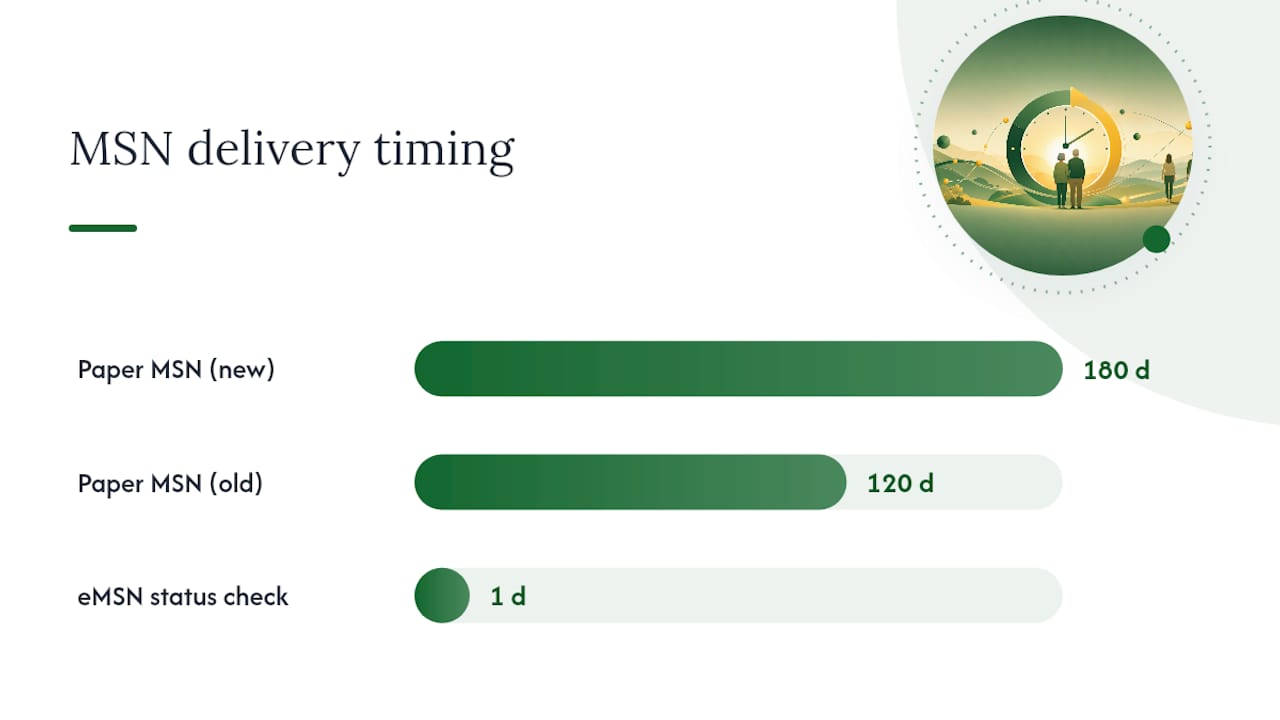
Starting in January 2026, Medicare mails paper MSNs every 180 days, not the 120-day cycle used before, according to CMS guidance. You’ll only receive one for a given period if you actually had a claim processed during it. No services, no notice. That’s normal, not an error.
Electronic MSNs (eMSNs) work on a different, faster schedule. Here’s how the process runs once you sign up:
- Create or log into a secure account at Medicare.gov.
- Update your communication preferences to select electronic delivery.
- Choose eMSN, and you’ll get a notice by email every month a claim processes, rather than waiting for the six-month paper cycle.
Going digital also means you can check a claim’s status within about 24 hours of Medicare processing it, instead of waiting weeks for mail. If you need large-print, Braille, or another accessible format, you can request it directly through your Medicare.gov account or by calling 1-800-MEDICARE. Signing up for electronic notices is one of the simplest ways to stay ahead of billing surprises rather than reacting to them months later.
How to Read Your Medicare Summary and Catch Problems Early
Reading an MSN closely takes ten minutes and can save you from paying the wrong amount or missing a billing error. Work through it the same way each time, and it stops feeling confusing.
Start with the basics before touching a single dollar figure. Confirm your name and the last four digits of your Medicare number match, and note the statement dates covering the claims listed. Then move claim by claim:
- Match each entry to an actual appointment, test, or piece of equipment you remember receiving.
- Confirm the provider’s name and the service date line up with your own notes or calendar.
- Check the “Service approved?” column. A “No” means Medicare denied the claim, which needs your attention now, not later.
- Compare what the provider charged against the Medicare-approved amount and what Medicare actually paid.
- Look at the maximum you may be billed, and ask whether a Medigap policy or other insurance should be covering that balance instead of you.
- Track your deductible status on the dashboard page so you know how close you are to meeting it for the year.
Counselors who work with beneficiaries regularly point out that MSNs shouldn’t be tossed once you’ve glanced at them. Hold onto each one until the matching provider bill actually arrives, then compare the two side by side. Keep copies afterward, too. They double as documentation if you need to file taxes, dispute a charge, or launch an appeal down the road.
Pro Tip: Keep a simple folder, paper or digital, sorted by month. When a provider bill shows up, pull the matching MSN before you write a check. If the numbers don’t match, that’s your cue to call, not pay.
What to Do When You Spot a Mistake or a Denied Claim
Finding an error on an MSN is common, and there’s a clear order of operations for fixing it. Move through these steps in sequence rather than jumping straight to an appeal.
- Call the provider first. Ask for an itemized statement and confirm what they actually submitted to Medicare. Billing offices make coding errors often enough that a simple correction and resubmission resolves most disputes without any formal appeal.
- Check the next MSN or your online account. After a provider resubmits, watch for the corrected claim to show up, and write down every date and name from each call you make in the meantime.
- File a formal appeal if the disagreement stands. The MSN’s last page spells out the exact appeal steps, and appeals must be submitted in writing by the deadline printed on that notice, typically 120 days from the date you received it.
Providers can often correct and resubmit a denied claim once the submission error is fixed, which resolves the issue faster than jumping to a formal appeal. Call 1-800-MEDICARE for general questions about a specific claim. For free, unbiased help walking through an appeal, contact your State Health Insurance Assistance Program (SHIP) or a certified counselor. Either way, keep a running log: dates, names of who you spoke with, and copies of every letter or form, since that paper trail matters if the appeal drags past one round.
Medicare Summary Notice vs. Explanation of Benefits
The MSN and the Explanation of Benefits (EOB) look similar but come from different places and cover different plans. Knowing which one applies to you determines who you call with questions.
- The MSN comes strictly from Original Medicare, covering Part A and Part B claims.
- An EOB comes from your private plan if you’re enrolled in Medicare Advantage or a Part D drug plan.
- MSNs now arrive every 180 days by mail (or monthly as an eMSN); EOBs, especially for prescription drug claims, often show up monthly regardless.
- Billing question on Original Medicare? Call 1-800-MEDICARE. Billing question on an Advantage or Part D plan? Contact that plan directly.
A Certified Planner’s View on the Mistakes People Actually Make
The most common mistake isn’t misreading a claim. It’s paying a provider the moment an MSN shows up, before any actual bill arrives. One case that sticks with me: a client nearly paid several hundred dollars listed as “maximum you may be billed,” not realizing her Medigap policy was supposed to cover that exact amount. A five-minute call cleared it up.
The rule I repeat most: never pay based on the MSN alone, and don’t shred it until the real bill lands and the two match. Keep every notice for appeals and tax records.
— Zach
Get Help Reading Your Notice From a Local Medicare Planner
Unlike a call center that reads from a script, Greenins gives you a real person who reviews your Medicare Summary Notice with you and explains exactly what each line means for your situation. If a denied claim or a confusing “maximum you may be billed” figure has you second-guessing your coverage, that’s usually a sign it’s worth a second look at your plan itself, not just the paperwork.

Green Insurance Agency’s certified Medicare Insurance Planners® offer claims support and appeals help, turning-65 consultations, and annual coverage reviews at no cost to you. Compensation comes from the insurance carriers, not from clients, so the initial review costs nothing whether you’re checking a denied claim, comparing a Medicare Supplement policy that might close a coverage gap, or just want a second opinion on your Part D plan. Visit the services page to schedule a no-cost review with a planner near Orange Park, Fleming Island, or Jacksonville.
Sources
FAQ
Is It Necessary to Keep Medicare Summary Notices?
Yes. Hold onto each MSN until the matching provider bill arrives so you can compare the two, and keep copies afterward for appeals or tax documentation. Counselors specifically advise against discarding them early, since they’re your main proof of what Medicare actually paid.
How Do I Get My Medicare Summary Notice?
Original Medicare mails a paper MSN every 180 days if you had a claim processed during that period, or you can switch to electronic delivery through your Medicare.gov account for monthly notices instead. Log in, update your communication preferences, and select eMSN to get faster access.
Why Am I Not Getting Medicare Summary Notices?
If you haven’t received any Medicare-covered services or supplies during the reporting period, Medicare won’t generate a notice for you, which is expected, not a mistake. If you believe you should have one and haven’t received it, check your claim status directly through your Medicare.gov account or call 1-800-MEDICARE.
What Is the Medicare Summary Notice?
A Medicare Summary Notice is Medicare’s official summary of the Part A and Part B claims filed for you, showing what was billed, what Medicare paid, and what you may still owe. It is not a bill, and it’s separate from any Explanation of Benefits you’d get from a private Medicare Advantage or Part D plan.